码云笔记
码云笔记 jQuery小插件实现table表格行列合并
AI 概述
HTML 代码css 代码插件源码参数表调用方法示例效果内容合并插件源码调用方法
最近在做项目时候,需求要求实现对表格中单元格列合并的功能,如果是只在某一列中进行合并操作,代码是遍历每行的某一列单元格,而这次的需求比较复杂,列数很多,都可以动态显示隐藏,原来的代码功能明显不够用了。
本插件...
目录
最近在做项目时候,需求要求实现对表格中单元格列合并的功能,如果是只在某一列中进行合并操作,代码是遍历每行的某一列单元格,而这次的需求比较复杂,列数很多,都可以动态显示隐藏,原来的代码功能明显不够用了。
本插件主要用于表格单元格的纵向合并,前提,每行的 tr 里都有一个属性,比如 data-pid,当上下行数据的这个属性值相等时,将一列或者多列的单元格纵向,用 class 标识需要合并的列。有的情况下,是只有少数列不合并,因此也支持用 class 标识不需要合并列。
HTML 代码
<table>
	<thead>
		<tr>
			<th>title1</th>
			<th>title2</th>
			<th>title3</th>
			<th>title4</th>
			<th>title5</th>
			<th>title6</th>
		</tr>
	</thead>
	<tbody>
		<tr data-pid="0">
			<td class="doMerge">content1-1</td>
			<td class="doMerge">content1-2</td>
			<td>content1-3</td>
			<td>content1-4</td>
			<td class="notMerge">content1-5</td>
			<td>content1-6</td>
		</tr>
		<tr data-pid="0">
			<td class="doMerge">content2-1</td>
			<td class="doMerge">content2-2</td>
			<td>content2-3</td>
			<td>content2-4</td>
			<td class="notMerge">content2-5</td>
			<td>content2-6</td>
		</tr>
		<tr data-pid="1">
			<td class="doMerge">content3-1</td>
			<td class="doMerge">content3-2</td>
			<td>content3-3</td>
			<td>content3-4</td>
			<td class="notMerge">content3-5</td>
			<td>content3-6</td>
		</tr>
		<tr data-pid="1">
			<td class="doMerge">content4-1</td>
			<td class="doMerge">content4-2</td>
			<td>content4-3</td>
			<td>content4-4</td>
			<td class="notMerge">content4-5</td>
			<td>content4-6</td>
		</tr>
		<tr data-pid="2">
			<td class="doMerge">content5-1</td>
			<td class="doMerge">content5-2</td>
			<td>content5-3</td>
			<td>content5-4</td>
			<td class="notMerge">content5-5</td>
			<td>content5-6</td>
		</tr>
	</tbody>
</table>
css 代码
table {
    border-collapse: collapse !important;
}

th,
td {
    border: 1px solid #999;
    padding: 10px 20px;
}
插件源码
(function ($) {
    $.fn.rowSpan = function (options) {
        return this.each(function (index, element) {
            var that = undefined;
            $('tr', this).each(function (trIndex, tr) {
                var tdSelector = 'td';
                if (typeof (options.mergeClass) !== 'undefined' && options.mergeClass.length > 0) {
                    tdSelector += '.' + options.mergeClass;
                } else {
                    tdSelector += ':not(.' + options.notMergeClass + ')';
                }
                if (typeof that !== 'undefined' &&
                    typeof ($(tr).attr(options.onAttr)) !== 'undefined' &&
                    $(tr).attr(options.onAttr) === $(that).attr(options.onAttr)) {
                    var firstTd = $(that).children(tdSelector);
                    if (firstTd.length == 0) {
                        return true;
                    }
                    var rowpan = firstTd.prop('rowspan');
                    rowpan += 1;
                    $(that).children(tdSelector).prop('rowspan', rowpan);
                    $(this).children(tdSelector).hide();
                }
                else {
                    that = tr;
                }
            });

        });
    };
})(jQuery);
参数表
| 参数名 | 默认值 | 功能 |
|---|---|---|
| onAttr | undefined | tr 的属性名,两行数据中这个属性值相等时才进行合并 |
| mergeClass | undefined | td 的类名,当 tr 的 onAttr 值相等时,此 td 进行合并 |
| notMergeClass | undefined | td 的类名,当 tr 的 onAttr 值相等时,除此 td 以外其他 td 合并(当 mergeClass 无有效值时才启用) |
调用方法
//调用实例 table 为页面里的表格
$('table').sdrowpan({
    onAttr: 'data-pid',         //tr 的属性名,两行数据中这个属性值相等时才进行合并
    mergeClass: 'doMerge',      //td 的类名,当 tr 的 onAttr 值相等时,此 td 进行合并
    notMergeClass: 'notMerge'   //td 的类名,当 tr 的 onAttr 值相等时,除此 td 以外其他 td 合并(**当 mergeClass 无有效值时才启用**)
});
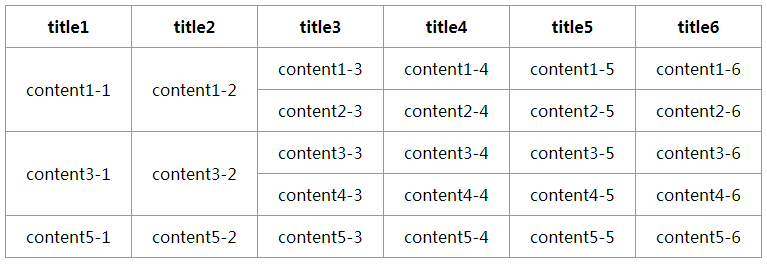
示例效果
$('table').sdrowpan({
   onAttr: 'data-pid',         //tr 的属性名,两行数据中这个属性值相等时才进行合并
   mergeClass: 'doMerge'      //td 的类名,当 tr 的 onAttr 值相等时,此 td 进行合并
});
上面调用代码效果截图显示:
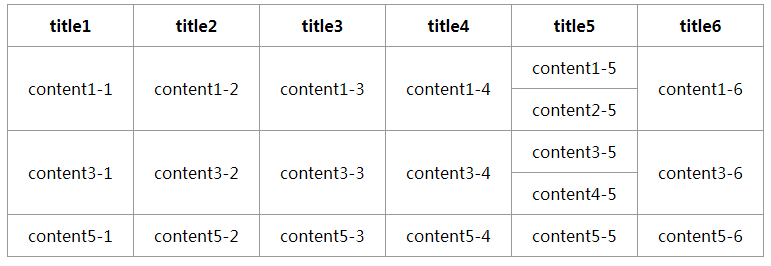
再来看看换种调用方式:
$('table').sdrowpan({
   onAttr: 'data-pid',         //tr 的属性名,两行数据中这个属性值相等时才进行合并
   notMergeClass: 'notMerge'   //td 的类名,当 tr 的 onAttr 值相等时,除此 td 以外其他 td 合并(**当 mergeClass 无有效值时才启用**)
});
上面调用代码效果截图显示:
接下来是根据 table 相邻行的重复内容合并插件方法,推荐给大家参考
内容合并插件源码
$.fn.extend({
    //表格合并单元格,colIdx 要合并的列序号,从 0 开始
    "rowspan": function (colIdx) {
        return this.each(function () {
            var that;
            $('tr', this).each(function (row) {
                $('td:eq(' + colIdx + ')', this).filter(':visible').each(function (col) {
                    if (that != null && $(this).html() == $(that).html()) {//$(this).attr('id') == $(that).attr('id')
                        rowspan = $(that).attr("rowSpan");
                        if (rowspan == undefined) {
                            $(that).attr("rowSpan", 1);
                            rowspan = $(that).attr("rowSpan");
                        }
                        rowspan = Number(rowspan) + 1;
                        $(that).attr("rowSpan", rowspan);
                        $(this).hide();
                    } else {
                        that = this;
                    }
                });
            });
        });
    }
});
调用方法
function initLoad() {
    $("#process").rowspan(0);
    $("#process").rowspan(1);
}
需要那列内容就填写那列序号即可,默认从 0 开始
以上就是今天全部内容,内容来源网络收集,如果遇到本插件满足不了需求的情况,大家可以参考代码,根据代码处理逻辑修改出试用于自己需求的插件。
以上关于jQuery小插件实现table表格行列合并的文章就介绍到这了,更多相关内容请搜索码云笔记以前的文章或继续浏览下面的相关文章,希望大家以后多多支持码云笔记。
 微信
微信 支付宝
支付宝声明:本文来自互联网用户投稿,该文观点仅代表作者本人,不代表本站立场。本站仅提供信息存储空间服务,不拥有所有权,不承担相关法律责任。
如若内容造成侵权/违法违规/事实不符,请将相关资料发送至 admin@mybj123.com 进行投诉反馈,一经查实,立即处理!
重要:如软件存在付费、会员、充值等,均属软件开发者或所属公司行为,与本站无关,网友需自行判断
码云笔记 » jQuery小插件实现table表格行列合并
如若内容造成侵权/违法违规/事实不符,请将相关资料发送至 admin@mybj123.com 进行投诉反馈,一经查实,立即处理!
重要:如软件存在付费、会员、充值等,均属软件开发者或所属公司行为,与本站无关,网友需自行判断
码云笔记 » jQuery小插件实现table表格行列合并


![[前端资源]基于jquery和css实现的简单五种Loading样式](https://mybj123.com/wp-content/uploads/2019/06/a14fa2166ed698f-1.gif)

![[jQuery教程]jQuery常用插件推荐(二十二)](https://mybj123.com/wp-content/uploads/2018/12/chajian.jpg)