
 码云笔记
码云笔记 jQuery实现tab选项卡切换的小插件
AI 概述
最近在做项目的时候,需要一个 tab 选项卡功能,即通过切换 tab 显示该 tab 下的不同内容,知识点很简单,我在这里以插件的形式写出来,分享给大家,调用方法直接使用即可。
效果:
HTML 代码
<div id="tab_demo" class="tab_demo">
<div class="tabBar clearfix"><span>选项卡一</span><...
最近在做项目的时候,需要一个 tab 选项卡功能,即通过切换 tab 显示该 tab 下的不同内容,知识点很简单,我在这里以插件的形式写出来,分享给大家,调用方法直接使用即可。
效果:
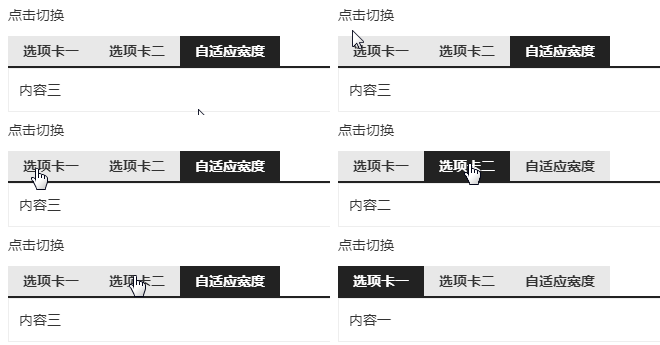
HTML 代码
<div id="tab_demo" class="tab_demo">
  <div class="tabBar clearfix"><span>选项卡一</span><span>选项卡二</span><span>自适应宽度</span></div>
  <div class="tabCon">内容一</div>
  <div class="tabCon">内容二</div>
  <div class="tabCon">内容三</div>
</div>
CSS 代码
.clearfix:after{content:"\20";display:block;height:0;clear:both;visibility:hidden}
.clearfix{zoom:1}
.tabBar {border-bottom: 2px solid #222}
.tabBar span {background-color: #e8e8e8;cursor: pointer;display: inline-block;float: left;font-weight: bold;height: 30px;line-height: 30px;padding: 0 15px}
.tabBar span.current{background-color: #222;color: #fff}
.tabCon {display: none}
JS 代码
引入 jQuery
<script type="text/javascript" src="lib/jquery/1.9.1/jquery.min.js"></script>
!function($) {
	$.fn.mytab = function(options){
		var defaults = {
			tabBar:'.tabBar span',
			tabCon:".tabCon",
			className:"current",
			tabEvent:"click",
			index:0
		}
		var options = $.extend(defaults, options);
		this.each(function(){
			var that = $(this);
			that.find(options.tabBar).removeClass(options.className);
			that.find(options.tabBar).eq(options.index).addClass(options.className);
			that.find(options.tabCon).hide();
			that.find(options.tabCon).eq(options.index).show();

			that.find(options.tabBar).on(options.tabEvent,function(){
				that.find(options.tabBar).removeClass(options.className);
				$(this).addClass(options.className);
				var index = that.find(options.tabBar).index(this);
				that.find(options.tabCon).hide();
				that.find(options.tabCon).eq(index).show();
			});
		});
	}
} (window.jQuery);
调用代码
$("#tab_").mytab();
以上关于jQuery实现tab选项卡切换的小插件的文章就介绍到这了,更多相关内容请搜索码云笔记以前的文章或继续浏览下面的相关文章,希望大家以后多多支持码云笔记。
 微信
微信 支付宝
支付宝声明:本文来自互联网用户投稿,该文观点仅代表作者本人,不代表本站立场。本站仅提供信息存储空间服务,不拥有所有权,不承担相关法律责任。
如若内容造成侵权/违法违规/事实不符,请将相关资料发送至 admin@mybj123.com 进行投诉反馈,一经查实,立即处理!
重要:如软件存在付费、会员、充值等,均属软件开发者或所属公司行为,与本站无关,网友需自行判断
码云笔记 » jQuery实现tab选项卡切换的小插件
如若内容造成侵权/违法违规/事实不符,请将相关资料发送至 admin@mybj123.com 进行投诉反馈,一经查实,立即处理!
重要:如软件存在付费、会员、充值等,均属软件开发者或所属公司行为,与本站无关,网友需自行判断
码云笔记 » jQuery实现tab选项卡切换的小插件
![[前端资源]基于jquery和css实现的简单五种Loading样式](https://mybj123.com/wp-content/uploads/2019/06/a14fa2166ed698f-1.gif)

![[jQuery教程]jQuery UI型插件推荐(二十三)](https://www.mybj123.com/wp-content/uploads/2018/12/uicj.png)
![[jQuery教程]jQuery常用插件推荐(二十二)](https://www.mybj123.com/wp-content/uploads/2018/12/chajian.jpg)


