
 码云笔记
码云笔记 3种方案实现跨行或跨列布局
今天要讲解的这个问题是之前一位小伙伴在群里请教的提问,是关于跨行跨列的布局,如下图是他要实现的具体布局,看似是最简单的二维布局,实际透露出整个 CSS 的发展方向。向前可以考察对兼容性的处理功底,向后可以考察对 CSS 新特性的洞察能力。可攻可受,攻守兼备。
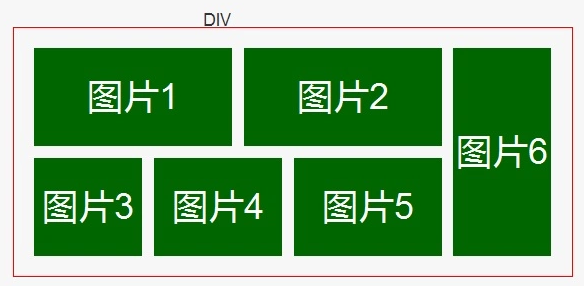
如果对此问题感兴趣的小伙伴先不要往下看我写的方案,自己想想在实际项目中遇到你会怎么做呢?
需要注意的是:这是一个两端对齐的布局,需要仔细考虑中间空隙的处理。
这里我给出三种方案实现,分别使用 css 中属性 float 实现、flex 实现、grid 实现
一、兼容方案 float
我想大家最容易想到的就是运用 float 的浮动特性,为了更好的处理间距,我们需要三层结构,利用 margin 负值来抵消间距,形成视觉上的两段对齐效果。
HTML 部分:
<h2>float 实现</h2>
<section class="demo">
  <div class="float">
    <section class="a">a</section>
    <section class="b">b</section>
    <section class="c">c</section>
    <section class="d">d</section>
    <section class="e">e</section>
  </div>
</section>
CSS 部分:
* {
  -webkit-box-sizing: border-box;
  -moz-box-sizing: border-box;
  box-sizing: border-box;
}
h1,
h2 {
  text-align: center;
  color: #555;
}
.demo {
  width: 620px;
  height: 310px;
  text-align: center;
  margin-left: auto;
  margin-right: auto;
  margin-bottom: 20px;
}
.demo section {
  margin-bottom: 10px;
  margin-right: 10px;
  border-radius: 9px;
  border: 1px solid blue;
  background-color: #66B2EC;
  color: #fff;
  font-size: 36px;
  text-transform: uppercase;
  line-height: 150px;
}
.float {
  overflow: hidden;
  margin-right: -10px;
}
.float section {
  width: 200px;
  height: 150px;
  float: left;
}
.float .a {
  height: 310px;
}
.float:hover .a {
  width: 410px;
  height: 150px;
}
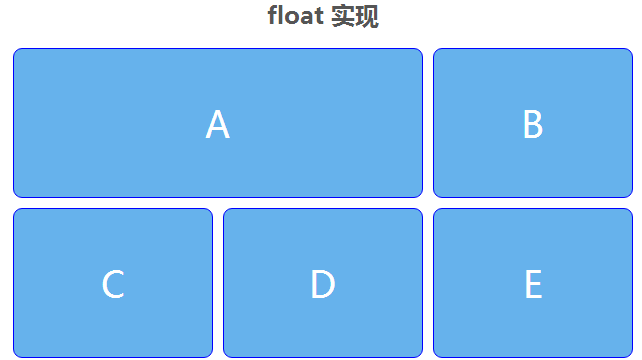
效果展示:
二、渐进增强 flex
flex 的处理需要一个小技巧,需要把主轴方向旋转 90 度,也就是 flex-direction: column。
- 优点:
flex 可以较好的处理两端对齐布局,中间的空隙可以通过 align-content: space-between,justify-content: space-between 来实现自适应(但超过两行或两列时会有问题)。
- 缺点:
需要通过 order 属性手动调节为正确的元素顺序。
HTML 代码:
<h2>flex 实现</h2>
<section class="flex demo">
  <section class="a">a</section>
  <section class="b">b</section>
  <section class="c">c</section>
  <section class="d">d</section>
  <section class="e">e</section>
</section>
CSS 代码:
.flex {
  display: flex;
  flex-direction: column;
  flex-wrap: wrap;
  align-content: space-between;
  justify-content: space-between;
}
.flex section {
  width: 200px;
  height: 150px;
  margin: 0;
}
.flex .a {
  height: 100%;
}
.flex .c {
  order: 4;
}
.flex .d {
  order: 3;
}
.flex .e {
  order: 5;
}
.flex:hover {
  flex-direction: row;
}

.flex:hover section {
  order: 0;
}

.flex:hover .a {
  height: 150px;
  width: 410px;
}
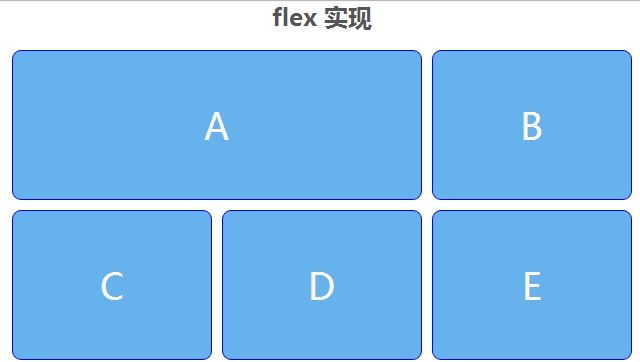
效果展示:
三、面向未来 grid
如果说从 Flex 开始 CSS 有了真正的二维布局特性,那么 CSS Grid 将是二维布局的未来。
- 优点:
(1)可以把传统的网页栅格体系直接对应到 CSS 声明,例如:
.grid {
    display: grid;
    grid-template-columns: 1fr 1fr 1fr;
    grid-template-rows: 1fr 1fr;
}
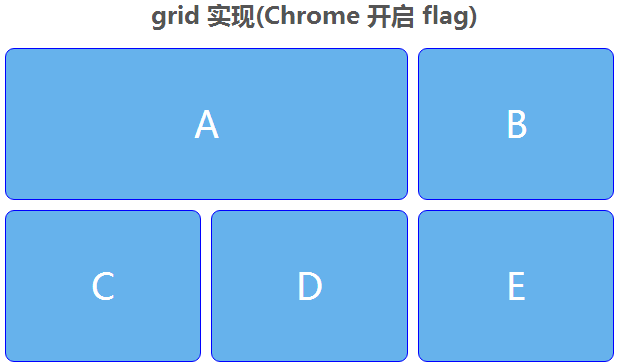
这样三句代码就表明我定义了一个两行三列的栅格,也就是题中的布局。
(1)通过 grid-column/row 属性里的 span 值可以方便的实现跨行或夸列,无需显性指定宽高的改变,非常方便的实现了跨行或夸列。
.grid .a {
    grid-row: span 2;
}
.grid .a:hover {
    grid-row: auto;
    grid-column: span 2;
}
最终实现代码
HTML 代码:
<h2>grid 实现(Chrome 开启 flag)</h2>
<section class="grid demo">
  <section class="a">a</section>
  <section class="b">b</section>
  <section class="c">c</section>
  <section class="d">d</section>
  <section class="e">e</section>
</section>
CSS 代码:
.grid {
  display: -ms-grid;
  display: -webkit-grid;
  display: grid;
  -ms-grid-template-columns: 1fr 1fr 1fr;
  -webkit-grid-template-columns: 1fr 1fr 1fr;
  grid-template-columns: 1fr 1fr 1fr;
  -ms-grid-template-rows: 1fr 1fr;
  -webkit-grid-template-rows: 1fr 1fr;
  grid-template-rows: 1fr 1fr;
}
.grid .a {
  -ms-grid-row: span 2;
  -webkit-grid-row: span 2;
  grid-row: span 2;
}
.grid .a:hover {
  -ms-grid-row: auto;
  -webkit-grid-row: auto;
  grid-row: auto;
  -ms-grid-column: span 2;
  -webkit-grid-column: span 2;
  grid-column: span 2;
}
效果展示:
这里网友推荐利用 display:inline-block 属性布局的方法
HTML 代码:
<body>
    <div class="row">
        <div class="item col-1 row-2">A</div>
        <div class="item col-1 row-1">B</div>
        <div class="item col-1 row-2">C</div>
    </div>
    <div class="row" >
      <div class="item col-5 row-1">D</div>
      <div class="item col-5 row-1">E</div>
      <div class="item col-5 row-1">F</div>
    </div>
</body>
CSS 代码:
*{margin:0;padding:0;}
.row {
  height: 150px;
  font-size: 0;
}
.item {
  box-sizing: border-box;
  vertical-align: top;
  height: 100%;
  overflow-y: visible;
  overflow-x: hidden;
  background-color: maroon;
  box-shadow: 4px 4px 0 #fff, -4px -4px 0 #fff,4px -4px 0 #fff, -4px 4px 0 #fff;
  display: inline-block;
  font-size: 20px;
  color: #FFF;
  text-align: center;
  padding: 8px;
}
.col-1 {
  width: 33.3333%;
}
.col-2 {
  width: 66.66666%;
}
.col-5{
    width:22.1333333%;
}
.row-1 {
  height: 100%;
}
.row-2 {
  height: 200%;
}
这里我们不讨论 table 布局,如果大家有更好的方案,欢迎留言投稿。
以上关于3种方案实现跨行或跨列布局的文章就介绍到这了,更多相关内容请搜索码云笔记以前的文章或继续浏览下面的相关文章,希望大家以后多多支持码云笔记。
 微信
微信 支付宝
支付宝如若内容造成侵权/违法违规/事实不符,请将相关资料发送至 admin@mybj123.com 进行投诉反馈,一经查实,立即处理!
重要:如软件存在付费、会员、充值等,均属软件开发者或所属公司行为,与本站无关,网友需自行判断
码云笔记 » 3种方案实现跨行或跨列布局


